













At the end of 2024, Criteo’s Video R&D team started working on a new goal: adding recommended products on top of videos, so that each display delivered to someone on the Open Web would become the most relevant possible. Over the last two decades, Criteo has continuously advanced its recommendation engine. Good news: From now on, videos will also benefit from these optimizations. Join me on our journey towards making these videos personalized and tell you everything I would have liked to know before delivering millions of displays a day in production.
Overlaying products on a video
Our design is the following: showing three waves of products coming from the right of the video with the following product information: price, image, and call to action. The video will be a video ad (we don’t put an overlay on content like a YouTube video, for example), and the products are recommended products using the Criteo recommendation engine.
Back to basics: Delivering a video ad
Before we dive deeper, it’s important to understand in which format a video ad is delivered. If it’s a new topic for you, I encourage you to first read this video introductory post on Criteo R&D blog and come back here in 5 minutes once you have done it!
Video Ads 101: How to define them
Nowadays, anyone can easily claim that video content is a new trend.
medium.com
Introducing video scripts and interactivity
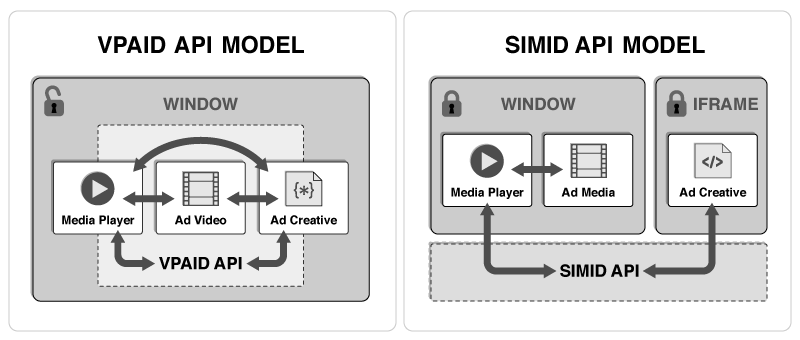
Historically, viewability (measuring what portion of an ad is viewed by a user) and interactivity (allowing the user to interact with more elements than the video only) have been achieved through a single standard: VPAID (Video Player-ad Interface Definition).
At bid time, the publisher passes the list of features it supports, and in case it supports VPAID, you will be able to provide a VPAID script that will be used by the player. Here’s an example of how the VPAID node is added:
<Linear> <MediaFiles> <MediaFile id="video"><![CDATA[https://criteo-assets/video1.mp4]]></MediaFile> <MediaFile id="vpaid_script" width="100" height="100"><![CDATA[https://criteo-assets/vpaid.js]]></MediaFile> </MediaFiles></Linear>Code language: HTML, XML (xml)At Criteo, the majority of our video ads are delivered on VPAID-compliant inventory.
Once loaded, the VPAID script will need to attach a getVPAIDAd to the iframe window to be called by the publisher. You can read a detailed view of the implementation specification in the VPAID IAB spec. Next, the player will call the initAd function from this VPAID object, passing various information about the ad slot, such as width, height, desiredBitRate and the HTML element in which the video should be rendered.
LinearAd.prototype.initAd = function(width, height, viewMode, desiredBitrate, creativeData, environmentVars) { // slot and videoSlot are passed as part of the environmentVars this._slot = environmentVars.slot; this._videoSlot = environmentVars.videoSlot; console.log("initAd"); };Code language: JavaScript (javascript)After this step, the script can do anything it wants! And this flexibility is one of the major drawbacks of VPAID. On top of bringing potential security issues by taking control over the webpage, it also delays the video rendering as the script has to be loaded first before it can load the video and start playing the ad. To fix this issue, IAB introduced two new frameworks in VAST 4.0, aiming at replacing VPAID: OMID, detailed in the previously linked article for viewability, and SIMID, which I will present below.
How do we deliver our scripts?
Latency is critical in Ad Tech: if an ad takes too long to render, users will likely scroll past it or some players may even discard it due to timeouts.
Criteo delivers ads all over the globe and to have the best latencies we use a CDN (Content Delivery Network). It provides very good latency for static assets and allows us to have our script in each Criteo datacenter over the planet.
SIMID
SIMID was introduced in 2019 and is compatible with VAST4.x versions or above. Below is how the information is provided inside the VAST.
<Linear> <MediaFiles> <InteractiveCreativeFile type="text/html" apiFramework="SIMID"><![CDATA[https://criteo-assets/simid.html]]> </InteractiveCreativeFile> </MediaFiles> <AdParameters><![CDATA[ my_parameters_to_pass_to_simid ]]></AdParameters></Linear>Code language: HTML, XML (xml)The SIMID script is loaded inside an iframe and will receive events from the player. The events can be user interactions, display resize, errors… The communication is done through the postMessage API and both the player and the creative have to follow a strict protocol to allow the creative to display.
Through this framework, SIMID has drastically improved the security and reliability of faulty interactive creatives. The creative always lives in a separate world from the video and can only have predefined interactions with it. And in case the interactive file is either faulty or slow, this does not prevent the video from loading anymore as it is still up to the player to load the video and does not depend on the script like VPAID.
Now, let’s go back to our interactive video feature and choose a framework to add this interactive layer. Due to better security, latency and especially because it is now the recommended way to go, we started using the SIMID framework.
Using SIMID in production
Today, we are serving millions of displays with a SIMID creative per day, giving us real-world feedback.
Separating the video from the creative brings many benefits but from a developer’s perspective, it adds complexity. First of all, I would advise anyone diving into the interactivity adventure to carefully read the SIMID specification provided by IAB. The specification will highlight all the different use cases that can occur in production. Some scenarios can’t be reproduced locally because you don’t have access to every publisher’s video player. Still, understanding these cases helps you anticipate issues and monitor them effectively.
Let’s take an example. Below is the top of the diagram of interaction between the video player (referenced as “player”) and our creative (referenced as “iframe”)

In this diagram, you can see that after the creative is downloaded and the script is initialized by the player, the creative has to send a createSession message, and afterwards, the player will send an init message. If the init message is never sent by the player, the creative will never be displayed because the player shows the creative only at the very end of this handshake process. Thus, we started monitoring whether players send the init message within 2 seconds of creative initialization. And thousands of displays per hour have the issue of not receiving an init message! And since our script is able to send the event, it has not been killed and thus we just have a creative that is not shown.
This brings us to something we learnt the hard way: if your creative does not load (your SIMID script throws an error on load, for example), the player will not default to its original behavior of being clickable and your video will not be clickable at all. It’s critical to handle all cases and ensure the creative renders. Otherwise, you lose the most important ad interaction: clicks.
Another issue we face is that players implement specifications differently. On init, the player can send or not the clickThruUri defined in VAST but since it is not required, some don’t. And thus this field becomes useless because we always send the clickThruUrl in the adParameters and rely on this field solely.
Improving the monitoring of interactive scripts
As seen before, a wide variety of errors can occur during the SIMID rendering. A major upgrade from VPAID to SIMID is the range and descriptiveness of SIMID error codes. Whereas VPAID basically had one (901, which is a generic error), SIMID now has 36!
11xx are the errors the creative can send, 12xx are the errors that the player can send.

However, very few of these errors are sent by the players. We usually have 1 error in a million displays with a SIMID specific error code.
What we have decided to do is to introduce our custom error codes starting at 10 000 (so we are sure not to overlap with IAB ones for a long time). Here are some examples:
- 10 000: Player sent us a Fatal Error
- 10 003: A product image from the carousel failed to load
- 10 004: A product image from the carousel timed out
- 10 008: No click URL was provided in the creative data at init time
These errors help us debug some issues we can have in production, foresee new ones, and test whether they occur.
State of the interactivity frameworks as we observed them in production
After working for months on SIMID to deploy our overlay, we decided to switch to VPAID because the process until rendering the creative was not robust enough, and we observed a downlift in the performance of our ads, which we attributed to the technology and not the overlay design itself.
This was confirmed by testing our VPAID creative in production, which brings stable results in terms of clicks and shows more user intent. We still kept some SIMID delivery on non-VPAID compliant traffic since it did not change the performance on this scope, but it still provides meaningful insights like click position.
SIMID has existed since 2019, and the plan is to decommission VPAID. However, it looks like this move will need better publisher adoption. Publishers and ad providers will need to work hand in hand to ensure the interactive ads deliver smoothly on the new framework before deprecating the old one.
While doing research on video interactivity, we found very few resources on implementing SIMID and even fewer on deploying it at scale. The purpose of this article is to contribute to the conversation and share our insights to help others navigate similar challenges. In case you have implemented interactivity through SIMID or VPAID, we’d love to hear your thoughts. On our side, most of our interactive videos still run through VPAID and are delivering successfully!
Join the discussion in the comments and let’s tackle the exciting technical challenges of interactivity together.